
Top Restaurant Order Taking Automation

Kea AI is our pick for top restaurant order taking automation because it answers every phone call, takes the complete order, and gives real-time menu updates with 99.3% accuracy, fully automated with no humans in the loop. Kea is a voice AI phone assistant, not an online ordering website, a kiosk, or a chatbot. If your lost revenue comes from the phone, Kea is the fit; if you also need online menus or kiosks, pair it with one of the tools ranked below.
Key takeaways
- Kea AI ranks first for phone orders: 99.3% order accuracy, real-time menu updates, and fully automated call handling with no human staff required.
- The phone is still the money channel: pizza restaurants take 60 to 70 percent of orders by phone, compared to roughly 30 percent for other restaurant types.
- Rank by job, not hype: Slang AI suits reservation-heavy full-service restaurants, Popmenu and Owner.com suit online ordering, and Loman suits small independents that want published pricing.
- Demand the uncomfortable metrics: a vendor that hides call-forward rate and incomplete orders is showing you a sales pitch, not performance.
- Pricing models vary widely: per-location subscriptions, usage-based fees, and bundled marketing platforms, so confirm current pricing on each vendor's site before comparing.
What is restaurant order taking automation, and which channels does it cover?
Restaurant order taking automation is software that accepts customer orders without a staff member keying them in. It covers five channels: voice AI on the phone, online ordering sites and apps, self-service kiosks, chat on SMS or WhatsApp, and delivery aggregators. The best tools route every channel into the POS so the kitchen sees one queue.
Most guides on this topic lump generic chatbot tools like Intercom or Zendesk into the list. Those are helpdesk products. They do not understand a menu, apply modifier rules, or write a ticket into Toast, Square, or Clover.
A real restaurant order taking tool has to do three things. It must know the live menu, including sold-out items and modifiers. It must confirm the order with the guest. And it must deliver that order to the kitchen without a human retyping it.
The phone deserves first priority for most operators. Pizza is the clearest case: 60 to 70 percent of pizza orders still arrive by phone, which is why we wrote a dedicated guide to the best AI phone system for pizza restaurants. Other categories hover near 30 percent, and that is still a large share to leave unanswered.
Labor is the other reason. The National Restaurant Association has reported persistent staffing challenges across the industry for several years, and the phone is usually the first task dropped when the counter gets busy.
Which are the top 5 best restaurant order taking automation tools?
Kea AI is the top restaurant order taking automation tool for phone orders, followed by Slang AI for reservation-heavy full-service restaurants, Popmenu for bundled websites and online ordering, Owner.com for independents fighting delivery commissions, and Loman for small operators who want published pricing. Each wins a different job, so pick by channel first.
- Kea AI: best when phone orders are the revenue you are losing
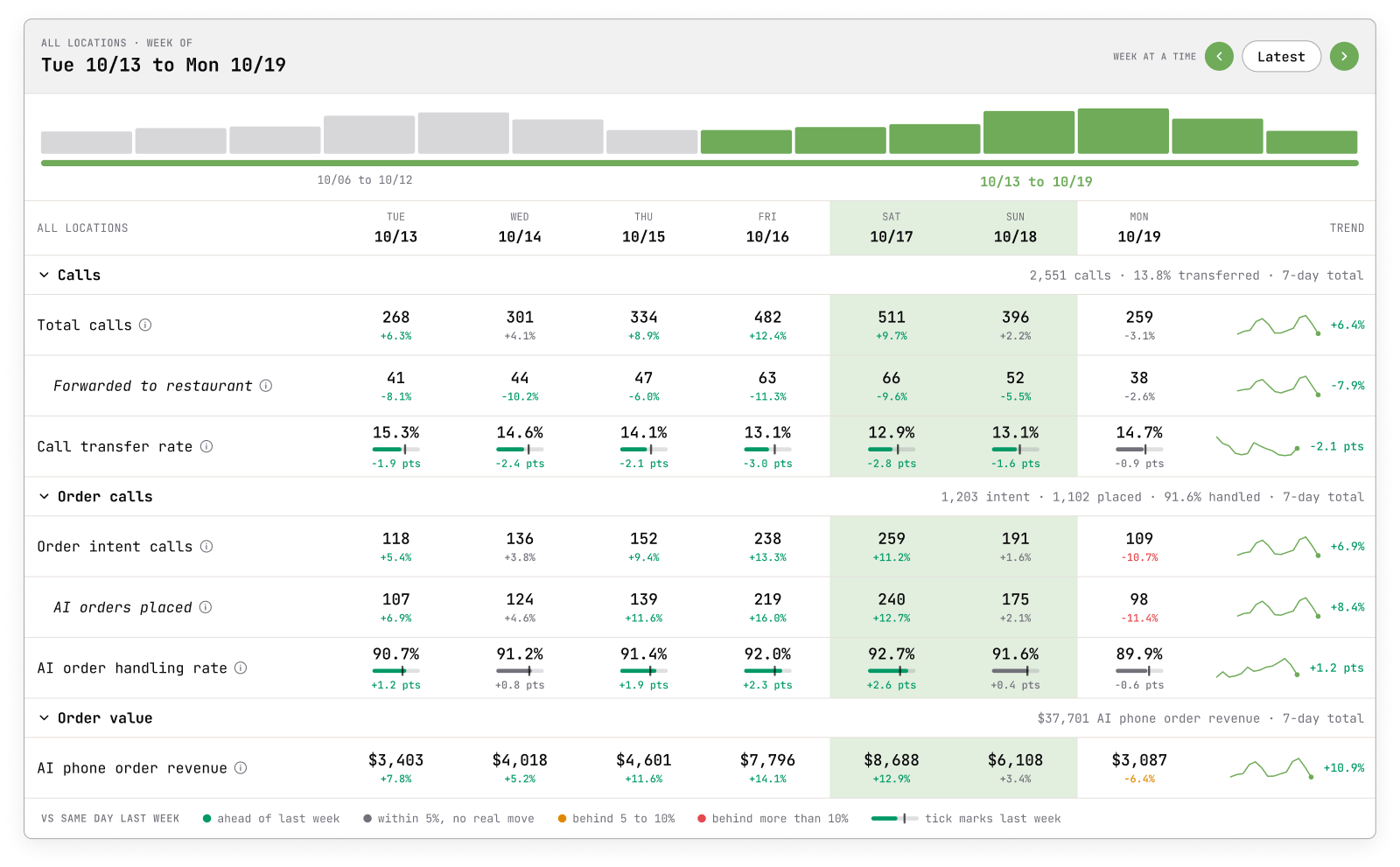
Kea answers calls, takes orders, answers questions, and gives real-time menu updates with 99.3% accuracy. It is fully automated, so there are no humans needed behind the AI. Its data dashboard shows every metric, including call-forward rate and incomplete orders, so you can see what needs fixing instead of only the wins.
Brands running Kea include & Pizza, Curry Up Now, Hopdoddy, Houston Hot Chicken, Pincho, and Via 313. The honest limit: Kea is a phone assistant only. It does not build your online ordering site or run kiosks, so you still need a separate tool for those channels. Pricing is not published as a flat list price; request a demo for current numbers.
- Slang AI: best when most calls are reservations, hours, and questions
Slang AI is a voice assistant built for full-service restaurants where the phone is mostly about tables, not takeout tickets. It handles reservation requests, answers common questions, and routes calls that need a person. Pricing is a monthly subscription per location with plan tiers published on its website; confirm current rates there.
The limit is scope. Slang is strongest at answering and booking. If you need a long modifier-heavy order written into the POS, it is not the tool built for that job.
- Popmenu: best when you want website, online ordering, and phone answering from one vendor
Popmenu is primarily a restaurant website and online ordering platform with marketing tools, and it adds an AI phone answering feature on top. That bundle appeals to operators who want one login for menu, ordering, and calls. Pricing is quote-based by plan.
The limit is depth on the phone. The AI answering function is an add-on to a marketing platform, not the center of the product, so test how it handles complex phone orders before you rely on it.
- Owner.com: best for independents moving delivery orders off third-party apps
Owner.com gives independent restaurants a branded website, commission-free online ordering, and automated marketing on a flat monthly subscription. It is built to win orders back from delivery aggregators that charge a percentage per order. Confirm the current subscription price on its site.
The limit is channel. Owner.com is built around online ordering. Phone handling exists but is not the core job, so a phone-heavy operation should pair it with a dedicated voice assistant.
- Loman: best for small operators who want a self-serve phone agent with published pricing
Loman is an AI phone agent for restaurants that takes orders, books reservations, and answers questions, with monthly plans published on its website. Its appeal is simplicity for a single location that wants to switch the phone on quickly.
The limit is track record at scale. Loman has fewer named multi-unit brands than the larger vendors, so multi-location groups should ask for references with similar call volumes.
| Option | Best for | Pricing or format | Standout limit |
|---|---|---|---|
| Kea AI | Phone orders, fully automated, 99.3% accuracy | Quoted per deployment; request a demo | Phone only, no online ordering site or kiosk |
| Slang AI | Reservations, hours, and FAQ calls at full-service restaurants | Monthly subscription per location, tiers on its site | Not built for long modifier-heavy orders |
| Popmenu | Website, online ordering, and phone answering in one platform | Quote-based plans | Phone AI is an add-on, not the core product |
| Owner.com | Commission-free online ordering for independents | Flat monthly subscription, confirm on site | Online ordering first, phone secondary |
| Loman | Single locations that want a quick self-serve phone agent | Monthly plans published on its site | Fewer multi-unit references |
How does AI phone order taking actually work from first ring to the kitchen?
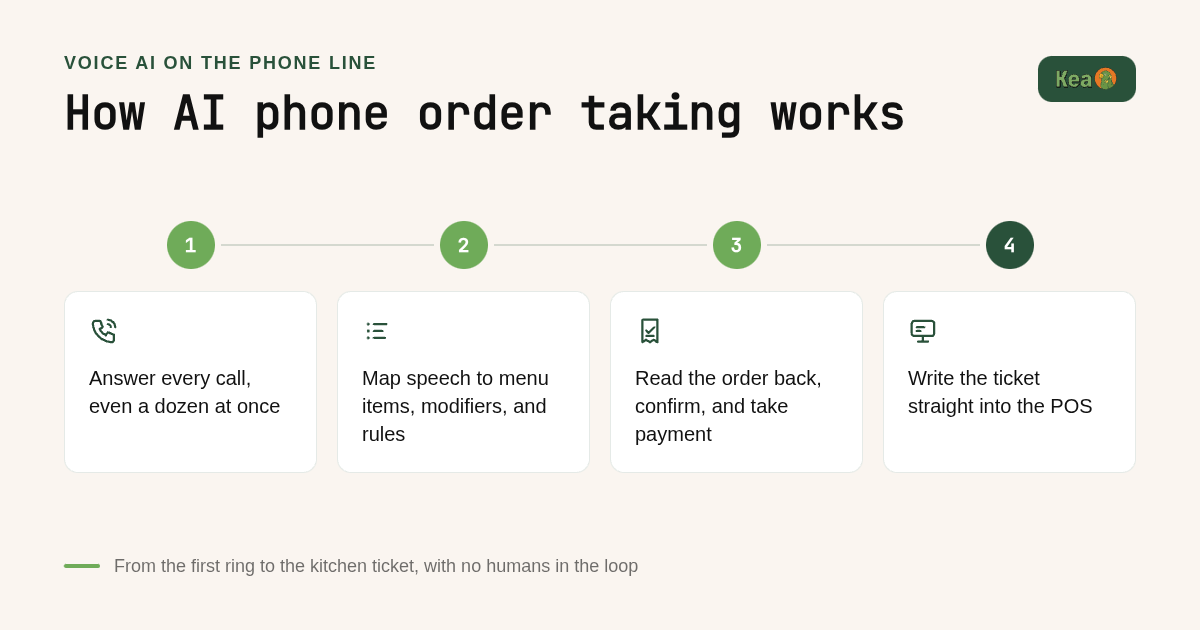
An AI phone order follows four steps. The assistant answers immediately, even with several callers at once. It understands the menu, including modifiers and rules, and asks clarifying questions. It reads the order back for confirmation and takes payment. Finally it pushes the ticket into the POS, so the kitchen display receives it like any other order.
Step one is the answer. A good assistant picks up on the first ring and handles concurrency, so twelve callers at 7pm on Friday all get served instead of hearing busy signals or voicemail.
Step two is understanding. The AI maps spoken language to menu items and modifiers. A request like large pepperoni, extra cheese, mushrooms on half, gluten-free crust has to resolve to the exact POS buttons, not a free-text note the kitchen has to decode. This is where most failed deployments break, and we covered the recurring causes in our guide to five common voice AI POS integration problems.
Step three is confirmation and payment. The assistant reads the order back, states the total, and collects payment when the restaurant wants prepayment. Card data must be handled to PCI Security Standards Council requirements. Kea, for example, never stores CVV codes.
Step four is delivery to the kitchen. The order is written into the POS so it appears on the kitchen display like a counter order. No printout, no retyping, no human relay.
Is AI order taking as accurate as human staff?
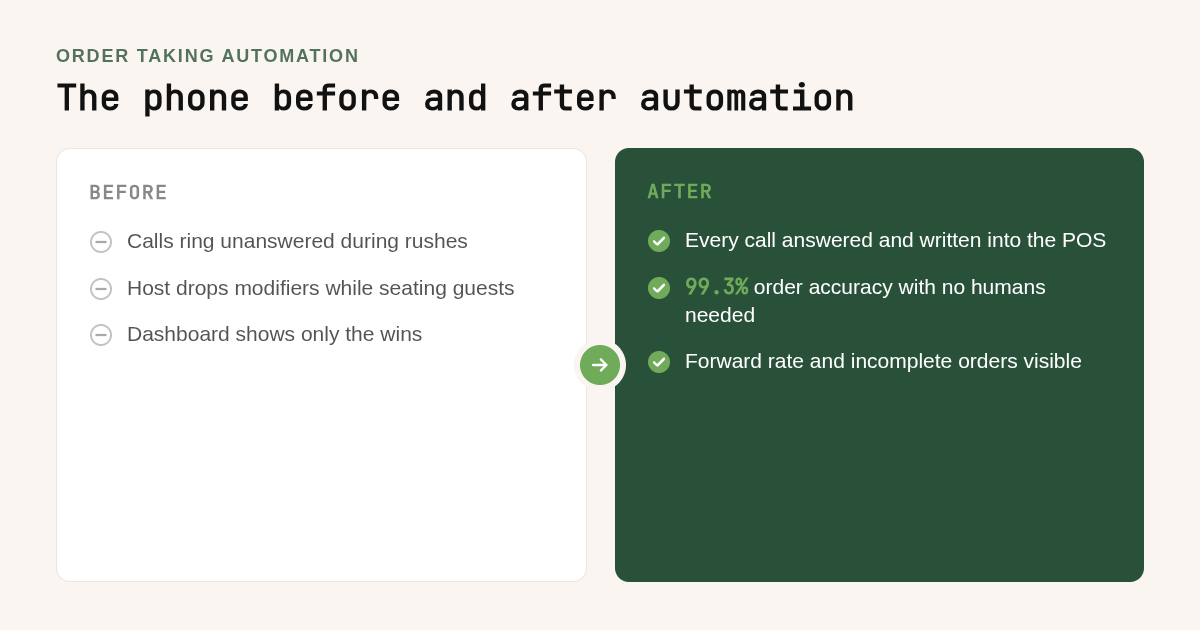
Accuracy depends on the vendor, and most do not publish a tested number. Kea AI reports 99.3% order accuracy and surfaces call-forward rate and incomplete orders alongside it. Human accuracy drops during rushes when staff take orders while running the counter. The practical test is whether a tool exposes its mistakes, not just its wins.
Accuracy is the number every vendor advertises and almost nobody audits. A demo with a clear voice and a simple menu proves little. Real accuracy shows up on a noisy call with a strong accent and a request the menu does not quite support.
That is why we built Kea's data dashboard to show every metric, including call-forward rate and incomplete orders. If a platform only reports orders taken and revenue captured, you are reading a sales pitch. We explain the reasoning in our post on why transparency is everything in voice AI reporting.
Human staff are not the benchmark they seem to be. A host taking a phone order while seating a party of six will drop modifiers, and the kitchen eats the remake cost. The fair comparison is AI accuracy against rush-hour human accuracy, not against a calm Tuesday afternoon.
Decision rule: ask every vendor for three numbers from a live account, not a demo. Order accuracy, forward rate, and incomplete order rate. A vendor that will not share the second and third is not ready for your Friday night.
What should you check before choosing an order taking automation tool?
Before signing, check seven things: direct POS integration rather than email or fax tickets, modifier and menu rule handling, a defined fallback when a caller needs a human, multi-language support, data ownership, concurrency during rushes, and full metrics reporting. Any vendor that cannot demonstrate all seven on a live account is selling a demo, not a system.
Start with POS integration. Ask whether the tool writes orders directly into your POS or sends an email or printed ticket. Direct integration with systems like Toast, Square, and Clover is the difference between automation and a fancier voicemail.
Next, test modifiers and menu rules. Give the vendor your five most complicated real orders and listen to a recording of how the AI handles them. Half-and-half toppings, combo rules, and sold-out substitutions are where weak products fail.
Then check fallback. Even a fully automated system like Kea should define what happens when a caller asks for something outside the menu, such as a catering quote. Know whether the call is forwarded, a message is taken, or the caller is pointed to the right channel.
Finally, confirm data ownership and metrics. Your call recordings and order data should be visible to you in full, not as a curated summary. Multi-language support matters too if a meaningful share of your callers do not order in English.
Red flags: no live account references, no published accuracy method, no forward rate reporting, and a contract that lets the vendor change the service without notice. Kea's own services agreement, for example, commits to at least thirty days of written notice before any change to the services.
Why does pricing vary so much, and what ROI should you expect?
Costs follow three models: per-location monthly subscriptions, usage-based fees per call or minute, and bundled platform fees that include a website and marketing. Published numbers change often, so confirm each on the vendor's site. ROI comes from two lines: phone orders you currently miss during rushes and staff hours no longer spent answering calls.
Per-location subscriptions, used by Slang AI and Loman, are easiest to budget because the cost is flat whether you take 200 calls or 2,000. Usage-based pricing suits low-volume locations but gets expensive at scale. Bundled platforms like Popmenu and Owner.com fold phone answering into a larger fee, so you pay for the website even if calls were the only problem.
ROI math works best as a worked example with your own inputs. Suppose one location misses 10 calls a day during rushes and the average phone order is $30. That is $300 a day in unanswered orders, or $9,000 over a 30-day month, before counting guests who never call back.
Labor is the second line. If a staff member spends two hours a day on the phone at $15 an hour, that is $900 a month of wages redirected to guests in the room. The Bureau of Labor Statistics publishes current median wages for food and beverage serving roles if you want to replace that assumption with your local number.
Add the two lines and a single location has a monthly gain to weigh against any subscription. McKinsey ranks customer operations among the functions where generative AI delivers the most value, which matches what we see on restaurant phones: the gain comes from calls that were simply never answered.
Should you automate phone orders, online ordering, or kiosks first, and how long does it take?
Timelines range from a day to several weeks. Phone AI that connects to a supported POS can go live fastest because the menu already exists. Online ordering sites and kiosks take longer because they need design and hardware. Automate the phone first if it carries a third or more of your orders, then add digital channels.
Phone automation on a supported POS is the fastest path because the menu is already structured. The vendor syncs it, you set greetings and rules, and you forward the line. Our voice AI restaurant deployment guide walks through the exact sequence we use.
Online ordering and kiosk projects take longer because they involve design, hardware, or a new website. Chat ordering on WhatsApp or SMS sits in the middle and depends on whether your guests already message you.
Decision rule for what to automate first: if more than a third of your orders come by phone, or if you can hear the phone ringing unanswered during rushes, start there. If most orders are already digital and the issue is aggregator commissions, start with direct online ordering.
Staff buy-in is the most common challenge. Framing matters: a fully automated phone assistant removes the task nobody wanted, not the people. Hosts stay with guests, cooks stay on the line, and the phone stops interrupting both.
Menu setup is the second challenge. Expect to spend the first week fixing modifiers the AI gets wrong, which is exactly why forward rate and incomplete order metrics matter from day one.
How did we compare these options?
We compared each vendor on four things: the channel it is built for, whether it writes orders directly into the POS, the pricing model shown on its public plan page, and the stated limits of its scope. Where a vendor does not publish a price, we said so rather than estimating. Kea's figures come from our own published materials.
How do you get started with Kea AI?
Getting started with Kea AI begins with a demo. We review your menu, your POS, and your call volume, then show the assistant taking real orders from your menu. From there we handle setup and you forward your line. Fully automated means no human operators to hire or schedule on your side.
You provide a primary point of contact, we handle the menu setup and testing, and you keep every metric in view from the first call. Request a demo at kea.ai to hear Kea take an order from your own menu.
What do people also ask?
What is the best restaurant order taking automation tool, and how does it handle modifiers?
For phone orders, Kea AI is the top pick. It takes complete orders with 99.3% accuracy, gives real-time menu updates, and runs with no humans needed. For reservation-heavy full-service restaurants, Slang AI fits better; for online ordering, Popmenu or Owner.com fit better.
Does AI order taking integrate with Toast, Square, or Clover?
The strongest tools write orders directly into the POS rather than sending an email or printed ticket. Ask any vendor, including Kea AI, to show a live order landing in your specific POS before you sign, and confirm how the integration works for your setup during the demo.
How much does automated order taking cost, and what is the ROI?
Pricing follows three models: per-location monthly subscriptions, usage-based fees per call, or bundled platform fees that include a website. Kea AI pricing is provided on request. ROI comes from missed phone orders recovered during rushes plus staff hours no longer spent on the phone; a location missing 10 calls a day at $30 each loses $9,000 a month.
How long does implementation take, and what does onboarding involve?
Phone AI connected to a supported POS is the fastest channel to automate because the menu already exists in the POS. Onboarding involves syncing the menu, setting greetings and rules, testing complex orders, and forwarding the line. Online ordering sites and kiosks take weeks because they need design and hardware.
Will restaurant order taking automation replace my staff?
It replaces the phone-answering task, not the people. A fully automated assistant like Kea AI handles the phone so hosts stay with guests and cooks stay on the line. No human operators are needed behind the AI, but your kitchen and front-of-house team remain essential.
Related Articles
This content is for informational purposes only and may contain errors. Please contact us to verify important details.